MRZ
Scan capability overview
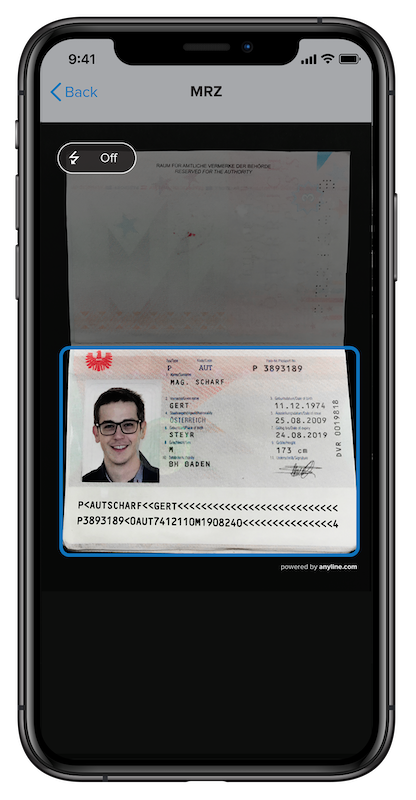
The Anyline MRZ mode provides the functionality to scan passports and other IDs holding a Machine Readable Zone (MRZ).
For each scan result, the MRZ mode generates an Identification object, containing all relevant information of the scanned document.
Machine Readable Travel Documents
This section shows the five main types of Machine Readable Travel Documents, according to ICAO
TD3 Documents
TD3 sized Machine Readable Travel Documents consist of two lines of 44 characters each.
The full specification can be found in Doc 9303 Part 4 on the ICAO Website
TD2 Documents
TD2 sized Machine Readable Official Travel Documents consist of two lines of 36 characters each.
The full specification can be found in Doc 9303 Part 6 on the ICAO Website
TD1 Documents
TD1 sized Machine Readable Official Travel Documents consist of two lines of 30 characters each.
The full specification can be found in Doc 9303 Part 5 on the ICAO Website
MRV-A Visa
Format-A Machine Readable Visas consist of two lines of 44 characters each.
The full specification can be found in Doc 9303 Part 7 on the ICAO Website
MRV-B Visa
Format-B Machine Readable Visas consist of two lines of 36 characters each.
The full specification can be found in Doc 9303 Part 7 on the ICAO Website
Other Machine Readable Documents
MRZ on Swiss Driving License
The MRZ on Swiss driving licenses is not following the ICAO standards. It consists of three lines - one line of 9 and two lines of 30 characters each.
For a full specification, we refer to the ASTRA brief
Scannable Visual Inspection Zone Information
The Anyline MRZ mode also provides the functionality to scan the Visual Inspection Zone (VIZ) of passports and other IDs in parallel to the MRZ. The fields of the visual inspection zone are prefixed with viz in the result.
VIZ Supported document types and countries
Below are tables that show which VIZ fields are supported for which countries and document types. VIZ fields might be NULL for supported countries and document types in the following cases:
-
The field is not visible in the cutout.
-
The quality of the scanned field is not good enough (it does not pass the validation check).
For non supported document types and countries, the fields will always be NULL.
Passports
| Country | Code | Date of Issue | Surname | Given Names | Date of Birth | Date of Expiry |
|---|---|---|---|---|---|---|
Austria |
|
✓ |
||||
United Kingdom |
|
✓ |
||||
Denmark |
|
✓ |
||||
Sweden |
|
✓ |
||||
Netherlands |
|
✓ |
||||
Ireland |
|
✓ |
||||
Norway |
|
✓ |
||||
France |
|
✓ |
||||
United States of America |
|
✓ |
||||
Germany |
|
✓ |
||||
Morocco |
|
✓ |
||||
Finland |
|
✓ |
||||
Italy |
|
✓ |
||||
Spain |
|
✓ |
||||
Russia |
|
✓ |
||||
Canada |
|
✓ |
||||
Poland |
|
✓ |
||||
Argentina |
|
✓ |
||||
Switzerland |
|
✓ |
✓ |
✓ |
✓ |
✓ |
Czech Republic |
|
✓ |
||||
Romania |
|
✓ |
||||
Australia |
|
✓ |
||||
Algeria |
|
✓ |
||||
Ukraine |
|
✓ |
||||
South Korea |
|
✓ |
||||
Slovakia |
|
✓ |